
iOS通知中心(UNUserNotifications)

本框架记录的是苹果官方文档UserNotifications的阅读中文笔记, 以及相关自己的理解.
本框架用于实现iOS APNs在iOS客户端的内容, 以及推送UI的定制.
请求通知权限
在App启动时请求授权。
Make your authorization request during your app’s launch cycle.
苹果官方文档要求我们把请求权限的代码写在App启动后的相关方法内。
使用UNUserNotificationCenter来请求通知权限。.current()方法用以获取此类的单例对象。
1 | let center = UNUserNotificationCenter.current() |
检查已请求权限的可用性
用户在第一次请求通知权限之后,后期是可以在系统设置里修改的。用户可以分别控制是否允许你的App开启通知声音,通知横幅,App角标等权限。
检查权限所以使用的相关依赖依然是UNUserNotificationCenter。
1 | let center = UNUserNotificationCenter.current() |
发送本地通知
推送一个本地通知主要分为以下几步:
- 创建
UNMutableNotificationContent对象,此对象用于描述通知的内容信息,比如标题和消息体。 - 创建
UNNotificationTrigger对象(可选)。此对象用于指定通知的触发方式,比如具体时间,具体地点,甚至时间周期。 - 创建
UNNotificationRequest对象,此对象用于描述一个通知请求,请求会带上以上创建的两个对象。 - 提交通知请求
1 | let notificationContent = UNMutableNotificationContent() |
定制通知行为
Actionable notifications
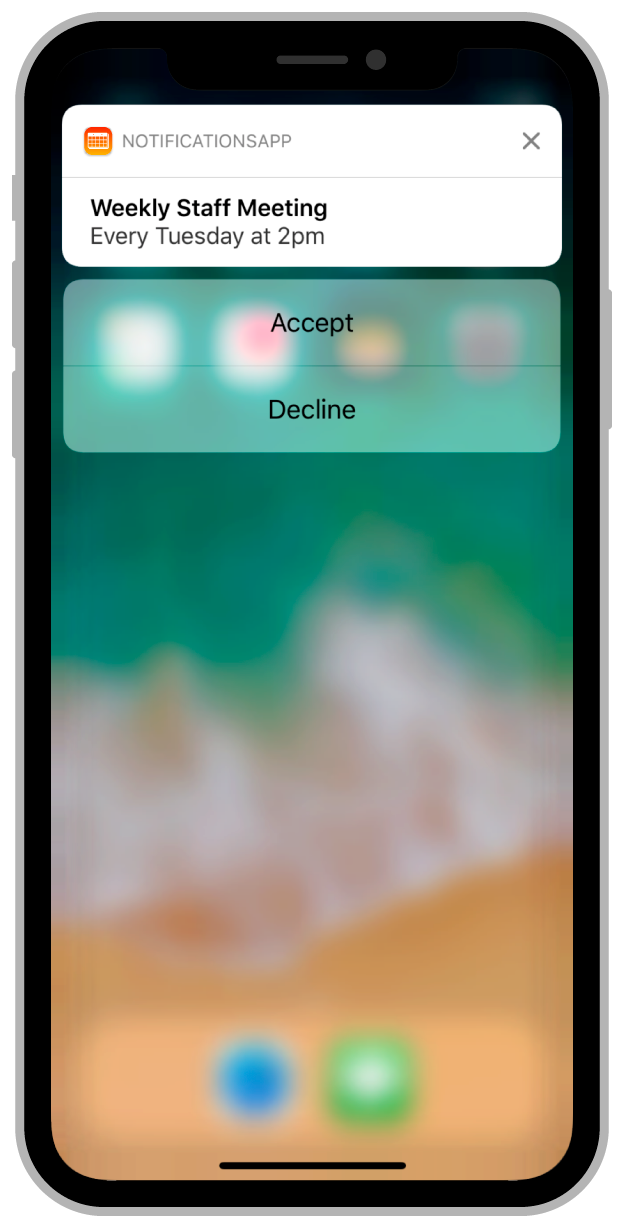
发送一个本地Actionable Notification
1 | /// identifier是此action的唯一标识符,title就是按钮的标题,options用于指定此按钮的一些行为,比如.authenticationRequired表示必须手机在解锁状态才能显示此按钮 |
以上代码的作用,注册一个notificationCategory,该category的标识符为ACTION_CATEGORY,本地通知或者远程通知都可以指定标识符,用于指定该通知响应的notificationCategory。
1 | let content = UNMutableNotificationContent() |
处理通知按钮点击事件
要处理通知按钮的点击行为,用户必须在程序启动完成之前注册代理,代理是UNUserNotificationCenterDelegate类型的对象,否则可能会错过程序启动时传入的通知。
实现optional func userNotificationCenter(_ center: UNUserNotificationCenter, didReceive response: UNNotificationResponse, withCompletionHandler completionHandler: @escaping () -> Void)方法,并根据带来的通知处理结果,来规划按钮的点击逻辑。
1 | func userNotificationCenter(_ center: UNUserNotificationCenter, didReceive response: UNNotificationResponse, withCompletionHandler completionHandler: @escaping () -> Void) { |
接收远程通知
使远程通知也可以显示自定义按钮,后端开发人员需要保证发送来的通知内容与这个类似:
1 | { |
只要payload内的category字段与App内置对应的的categoryIdentifier匹配,收到此通知时下拉或者重按,即可出现按钮。
处理通知(前台)
在前台的时候收到通知会回调这个方法:userNotificationCenter(_:willPresent:withCompletionHandler:),请注意,是收到通知而非点击通知。
1 | func userNotificationCenter(_ center: UNUserNotificationCenter, willPresent notification: UNNotification, withCompletionHandler completionHandler: @escaping (UNNotificationPresentationOptions) -> Void) { |
在App收到通知之前,修改通知的内容(payload)
要实现这个类似于”拦截通知”的功能,你需要新建一个Notification Service Extension。
在Xcode项目里,点选菜单栏File -> New -> Target, 然后选择Notification Service Extension,填写信息并完成创建。
在Xcode为你新建的文件模板里,已经实现了基本的推送文案修改。
1 | /// 使用此方法来修改通知信息,将最终的结果通过contentHandler回传给系统 |
请注意,系统只会在你的APNs Payload内包含下列信息时,才会执行此拓展:
- 必须包含
mutable-content,且value为1; - 必须包含
alert字典,且其中的body或者title必须有值;
1 | { |
自定义通知UI
要实现这个功能,你需要新建一个Notification Content Extension.
在Xcode项目里,点选菜单栏File -> New -> Target, 然后选择Notification Content Extension,填写信息并完成创建。
1 | The file list we got after creation. |
以下是注意事项:
- 你不能在Extension里面自己新建ViewController文件,你也不能再storyboard里面新建scene,一个Notification Content Extension只能对应一种Notification Category.
- 你可以用新建多个Notification Content Extension的方式来实现多种通知UI的定制,需要注意的是,多个不同的extension,你需要保证所支持的Notification Category的唯一性.
修改UI样式
你可以在MainInterface.storyboard或者NotificationViewController.swift中自定义UI,内容的高度可以根据autolayout自适应.
UI的编写就跟一般的UIViewController是一样的,需要注意的应该就是这里的ViewController高度应该是刚刚好跟内容大小一致的,所以说对AutoLayout有一定的要求.
1 | /// 此方法将会在第一次下拉通知以及后续有其他相关通知到达之后,被调用 |
为你的自定义UI指定所支持的通知类型
前面说了,我们可以用UNNotificationCategory.identifier来确定每一种通知的唯一性.
当系统收到通知时,系统会匹配NotificationCategory的identifier,来确认其是否存在一个自定义通知UI.
在Info.plist文件中,使用UNNotificationExtensionCategory字段指定此extension所支持的Notification Categroy.
1 | ... |
- 标题: iOS通知中心(UNUserNotifications)
- 作者: Aron
- 创建于 : 2019-05-19 20:25:00
- 更新于 : 2025-10-14 09:29:25
- 链接: https://likeso.github.io/2019/05/19/usernotifications/
- 版权声明: 本文章采用 CC BY-NC-SA 4.0 进行许可。